




Across Reddit’s Power BI and Microsoft Fabric communities, one debate keeps resurfacing:
“Do I really need Fabric if I already have Power BI Premium?”
It’s a fair question. Both are flagship Microsoft data products, both promise scale, and both fall under the same subscription umbrella. Yet, their purposes and resource management models are fundamentally different. Fabric uses Capacity Units (CUs) for compute. Premium uses dedicated capacity SKUs.That distinction is what confuses thousands of BI developers, data architects, and consulting teams trying to choose the right platform mix.
This post looks beyond Microsoft’s marketing pages and explores what actual users on Reddit have learned through experience – the benefits, trade-offs, and pitfalls of each. And we’ll end by showing where Reporting Hub fits in, helping organizations simplify governance and sharing whether they’re building on Fabric, Power BI Premium, or both.
What Microsoft Fabric Really Is
Launched in 2023, Microsoft Fabric represents a unification of the entire data analytics stack under one SaaS platform. It’s designed to bring together features from Azure Data Factory, Synapse, and Power BI into one SaaS environment. It will not fully replace them, as some standalone Azure services still work independently.

Fabric’s core strength lies in data integration and engineering. It brings together data movement, storage, and preparation in a single, governed place. Its key components include:
- OneLake – a universal data lake built on open-format storage (Parquet/Delta)
- Data Pipelines and Dataflows – for orchestrating ingestion and transformation
- Lakehouse and Data Warehouse – for modeling and querying large datasets
- Notebooks and Spark – for data science and AI workflows
- Integration with Copilot – for conversational data preparation and modeling
Essentially, Fabric is your data backbone – the infrastructure where information lives and transforms before it ever reaches dashboards.
As one Redditor put it, “Fabric is where the data happens before Power BI tells the story.”
While its promise of consolidation is exciting, Reddit threads often mention that Fabric is still evolving. Early adopters mention that compute usage is unpredictable because of changing Capacity Unit consumption, a lack of workload management tools, and unclear pricing. For many organizations, it’s not yet the “plug-and-play” solution that Power BI Premium has become.
Power BI Premium: The Proven Analytics Engine
Power BI Premium, in contrast, sits closer to the end of the analytics lifecycle. It’s the environment for reporting, visualization, and governed distribution.
Reddit users repeatedly praise Premium for its reliability and scale:
- Dedicated capacity: predictable performance within set SKU limits. However, using too many resources can still lead to throttling if memory or refresh thresholds are surpassed.
- Larger dataset limits (up to 400 GB per model)
- Paginated reports for operational and financial reporting
- Row-level security (RLS) for granular access control
- No per-viewer licensing when used with Power BI Embedded. However, embedding requires an A or EM capacity and a service principal with correct workspace access.
Premium excels when the goal is clear: deliver insights quickly and securely to many users.
In Reddit’s words:
“Fabric might be the future, but Premium is how we deliver analytics today.”
The Reddit Verdict: Complementary, Not Competing
After reading through dozens of Reddit discussions, a pattern emerges:

Fabric
- Focuses on data engineering and storage
- Best for large, complex data ecosystems
- Requires developer and engineering skills
- Pricing tied to compute units (Capacity Units)

Power BI Premium
- Focuses on data visualization and distribution
- Best for executive dashboards and reports
- Accessible to business analysts
- Pricing based on dedicated capacity (A/P SKUs)
Most users agree they’re not direct alternatives. They serve different layers of the analytics architecture. Fabric is for data preparation and engineering. Premium is for semantic modeling and visualization. But because Microsoft bundles them under the same marketing roof, it’s easy to misunderstand which one you truly need.
One Reddit user summarized it well:
“Fabric is for building the kitchen. Power BI Premium is for serving the meal.”
Where Pricing Creates Confusion
Microsoft Fabric uses a consumption-based model built around Capacity Units (CUs). You pay for active compute time using Capacity Units (CUs). Storage and inactive resources have separate costs. This is different from Premium’s fixed monthly capacity pricing.While that offers flexibility, many Reddit threads warn that it’s difficult to predict monthly costs, especially during heavy data refreshes or experimentation.
Power BI Premium, on the other hand, operates on capacity tiers (P-SKUs for enterprises and A-SKUs for embedded scenarios). That means:

You know your monthly cost upfront.

You can share dashboards with unlimited viewers via Embedded.

You keep workspace-level governance in Premium.
For most small-to mid-sized teams, this transparency makes Premium more practical. As one Reddit commenter noted:
“Fabric billing feels like Azure all over again – great flexibility, but you need a finance degree to forecast it.”
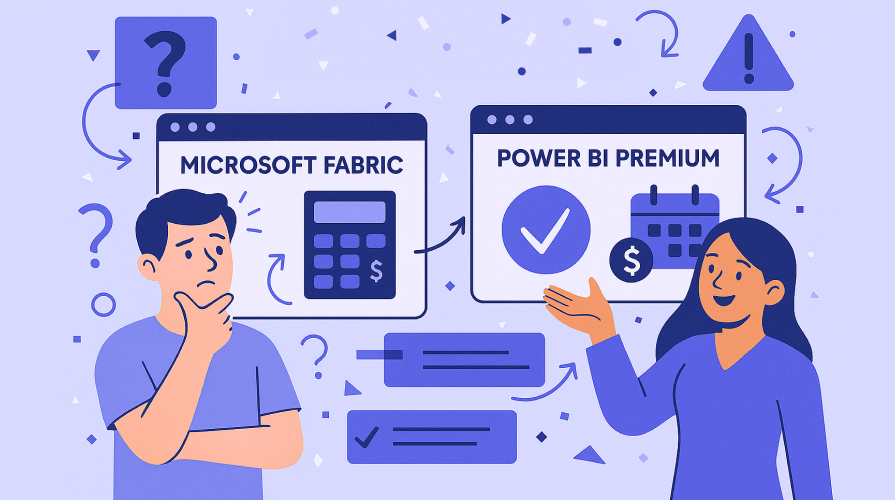
Power BI Service vs. Fabric Workspace: What Users Actually Experience
Reddit users often describe the day-to-day difference between the two environments:
Power BI Service – built for creators and analysts
- Simple drag-and-drop visuals
- Real-time data exploration
- Dashboard sharing and collaboration
- Quick onboarding for non-technical users
Fabric Workspace – built for developers and engineers
- Fabric Workspace manages connections, data pipelines, and Lakehouse or Warehouse objects. Dataset creation and visualization usually take place in Power BI Service.
- Allows advanced control over storage and refreshes
- Great for automation and multi-environment management
Integrating Fabric and Power BI Premium
Despite their differences, combining both can be transformative.
Reddit users who have successfully connected Fabric data to Power BI Premium describe major benefits:

Advantages
- Real-time access to data pipelines and Lakehouse assets
- Centralized governance through Fabric’s unified data model
- Improved collaboration between data engineers and analysts
“We use Power BI to visualize Fabric Lakehouse data. It’s a game changer – no more silos between data prep and reporting.”

Challenges
- Steep learning curve in Fabric’s new UX
- Occasional syncing and refresh delays may happen if the Fabric dataset refresh and the Power BI scheduled refresh overlap. Use staggered scheduling or DirectLake to avoid this issue.
- Cost spikes for smaller tenants
Power BI Embedded: The Real Bridge to Scale
Are you feeling lost in the tangled mess of Power BI Pro? You shouldn’t. There’s a promising solution: ‘SaaSify’ your Power BI.
If Power BI Premium is the engine, Power BI Embedded is the delivery system. It allows developers to add fully interactive Power BI reports into custom apps or portals using service principals and embedded capacity. Viewers don’t need licences, but embedding requires proper API authentication.
On Reddit, this feature often gets the loudest praise:
“Embedded let us roll out dashboards to 300 clients overnight without a single Pro license. Total game changer.”
Embedded uses Azure A-SKUs, starting at about $750 per month for A1. However, pricing varies by region and compute hours. You can also pause capacity to manage costs. It’s predictable, cost-efficient, and developer-friendly.
Reporting Hub: Power BI Embedded, Simplified
For organizations navigating the Fabric vs Premium maze, Reporting Hub acts as the clarity layer on top.
Built on Power BI Embedded, Reporting Hub is a white-label portal that lets you deliver analytics under your own brand, with zero code and full governance.
What It Solves


.png)

Instead of juggling multiple Power BI workspaces, permissions, and manual sharing, Reporting Hub gives you one secure, branded front-end where all dashboards live.
“We built a branded analytics portal for clients in days, not months,”
shared one Reddit user referencing their experience with a white-label Power BI deployment.
For consulting firms, agencies, and product teams, Reporting Hub turns Power BI into a SaaS-ready product.
A Closer Look at Security: RLS and Governance
Reddit discussions frequently highlight Row-Level Security (RLS) as one of Power BI Premium’s most valuable enterprise features. It ensures users only see the data relevant to them.
In contrast, Microsoft Fabric takes a more generalized, dataset-level approach to access control. Fabric supports workspace and item-level permissions, but dataset-level Row-Level Security (RLS) is not fully integrated. Roles must be set up in Power BI or enforced through Azure AD.
Reporting Hub takes the RLS model even further. Its portal governance layer automatically enforces RLS across every embedded dashboard, so admins don’t need to replicate roles across multiple workspaces. It’s a level of automation the community has long asked Microsoft for.
Fabric OneLake vs Power BI Datasets: Which Fits Your Use Case

Fabric OneLake
A unified data lake built on Delta/Parquet formats that supports both structured and semi-structured data. It’s optimized for petabyte-scale analytics and cross-domain collaboration.

Power BI Datasets
Curated semantic models optimized for analysis and visualization. They store relationships, measures, and calculated columns – the logic behind reports.
Redditors generally recommend:
- Choose OneLake when dealing with large-scale, raw, or semi-structured data that needs to be transformed or shared across domains.
- Choose Power BI Datasets when you need semantic models for reporting.
Many hybrid architectures now combine both ingest and store data in OneLake, build semantic models in Power BI, and share securely via Reporting Hub using Embedded capacity.

When Consulting Firms Prefer Power BI Premium
Reddit’s consulting-focused threads show a clear pattern: Power BI Premium dominates in client-facing reporting because of its simplicity, scalability, and control.
A few standout user remarks:
“Premium’s shared datasets saved us from maintaining 40 separate Excel models.”
“Fabric’s collaboration tools are great, but Power BI is still where the client value lives.”
Consultants love Premium for its stability. Fabric is still maturing powerful for data engineering workflows, but not yet optimized for external reporting or multi-tenant delivery.
Where Reporting Hub Adds Real-World Value
Let’s connect the dots. Across Reddit, three recurring frustrations emerge:


Reporting Hub resolves all three:


It’s how Power BI Premium truly becomes a scalable SaaS-ready analytics platform.
When to Use Fabric, Power BI Premium, and Reporting Hub
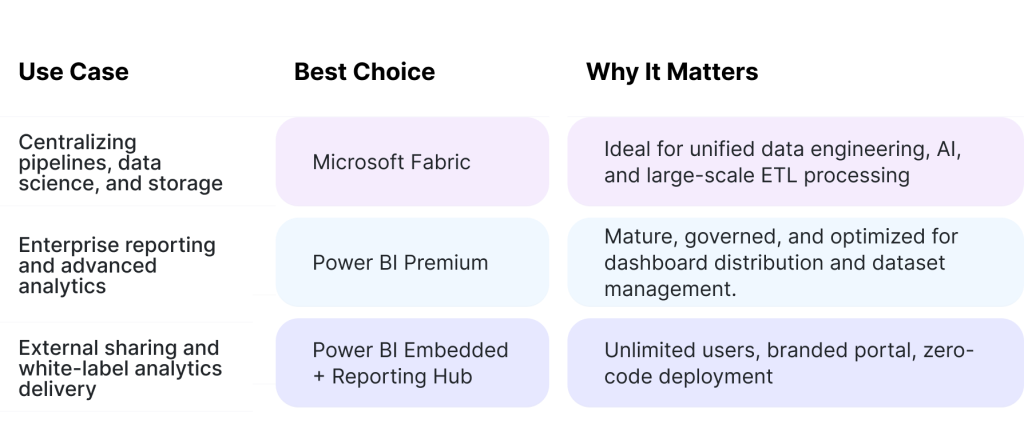
The sweet spot for most organizations in 2026 lies in the Premium + Reporting Hub combination – Fabric optional.
Conclusion: Clear Strategy Beats More Tools
Microsoft Fabric is an ambitious unified SaaS platform designed to streamline data engineering, storage, and analytics workflows.

Power BI Premium remains the enterprise engine for creating, modeling, and securely distributing insights at scale. Together they form a strong analytics stack, but only if you have the scale and resources to manage both.
For most teams today, the immediate win lies in mastering Power BI Premium and leveraging Reporting Hub to simplify governance, automate sharing, and deliver analytics under your own brand.
Reddit’s collective advice echoes this:
“Start with what brings value now. Fabric can come later – Power BI Premium plus Embedded already does 90% of what you need.”
If you’re ready to turn that 90% into 100 % – with automated governance, secure sharing, and no license chaos – Reporting Hub is built for you.