

How Much Does Power BI Cost in 2026?
Power BI Free costs $0, Pro $14 and Premium Per User $24 per user monthly; Fabric and Embedded capacities vary by size and region.
Per-user licenses attach to named people, and Microsoft bills Pro and Premium Per User per seat with yearly payment. Capacity licensing buys a pool of compute that everyone in the organization shares. Fabric capacity bills through Azure in capacity units, hourly on pay-as-you-go or annually on a reservation. Embedded capacity bills hourly per node and stops accruing compute charges when paused.
Buying capacity does not retire every employee’s license. Microsoft requires a Pro license for anyone who publishes Power BI content to a Premium or Fabric capacity, according to the footnotes on its pricing page. Pro also arrives inside Microsoft 365 E5 and Office 365 E5 subscriptions, so some seats may already be paid for. Free accounts cover personal report building but not sharing.
Per-user prices are US dollar list prices from Microsoft’s pricing page.
Power BI Pro vs. Premium Per User: What Does Each License Cost?
Power BI Pro covers publishing and collaboration, while Premium Per User adds larger models, faster refresh schedules and enterprise features for $10 more per user each month. Microsoft quotes both prices per user per month with yearly payment, and sells both through self-service checkout or the Microsoft 365 admin center. Across twelve months, a Pro seat costs $168 and a PPU seat costs $288.
Power BI Pro Cost: $14 Per User Per Month
Pro lets a user publish reports to shared workspaces, build apps and share dashboards with other licensed users. Microsoft also includes paginated reports in Pro, so a Pro holder can publish Report Builder files to a team workspace without buying capacity.
Semantic models in that workspace top out at 1 GB, and each model refreshes up to eight times a day. Native storage runs 10 GB per license. Everyone who opens the content in a standard workspace needs a Pro or PPU license of their own.
Power BI Premium Per User Cost: $24 Per User Per Month
Premium Per User lifts the model ceiling from 1 GB to 100 GB and the refresh limit from 8 to 48 a day. It adds the XMLA endpoint with read/write access, advanced dataflows, advanced datamarts and advanced AI features. Native storage rises from 10 GB per Pro license to 100 TB.
Can You Upgrade From Power BI Pro to Premium Per User?
Microsoft sells a PPU add-on to people who already hold Power BI Pro, Microsoft 365 E5 or Office 365 E5. The add-on lists at $14 per user per month on a yearly term, which is the incremental price and not the full $24 subscription. An E5 user already receives Pro through the suite, so $14 is the whole added Power BI cost.
A standalone Pro subscriber who adds the add-on pays $14 plus $14, or $28 combined, against $24 for a standalone PPU subscription. The $10 gap between the two list prices misstates the upgrade bill, and the checkout page in the Microsoft 365 admin center shows what an account actually pays.
How Much Does Microsoft Fabric Cost for Power BI?
Microsoft Fabric pricing starts with the capacity unit count assigned to an F-SKU. For the US-dollar illustration below, the calculation uses $0.18 per CU-hour and a reservation rate of $938 per CU per year. Fabric supports both pay-as-you-go billing and one-year reservations; the reservation commits the organization to the full term, even when capacity is paused. Power BI shares that capacity with Fabric workloads such as warehouses, notebooks and pipelines.
Microsoft Fabric F2 to F64 Pricing
Pay-as-you-go Fabric capacity can be paused, which stops compute charges while the capacity remains off. OneLake storage and other separately billed services can continue to incur charges.
Is Fabric Cheaper With Pay-As-You-Go or Reserved Capacity?
Microsoft advertises savings of 40.5% for a Fabric reservation compared with pay-as-you-go pricing, subject to the reservation terms. At the stated rates, F64 costs $8,409.60 for 730 pay-as-you-go hours. The one-year reservation averages about $5,002.67 per month. The reservation costs less above about 434 operating hours per month. Below that point, pausing pay-as-you-go capacity can cost less.
BARC's BI & Analytics Survey 26 reported that 77% of top-performing companies conducted a formal competitive evaluation before purchase. The figure was 43% among the lowest-performing companies. The report also describes growing cost pressure during BI tool selection, supporting careful workload review before a long capacity commitment.
Power BI Pro vs. Fabric: When Does Capacity Become Cheaper?
A comparison based only on total employee count leaves creator licensing out of the calculation. People who publish Power BI content to Fabric capacity still need Pro or PPU licenses, including on F64. Free licenses can cover eligible viewers on F64 or larger capacity, so the viewer count determines the per-user savings in the comparison below.
How to Calculate the Power BI Break-Even Point
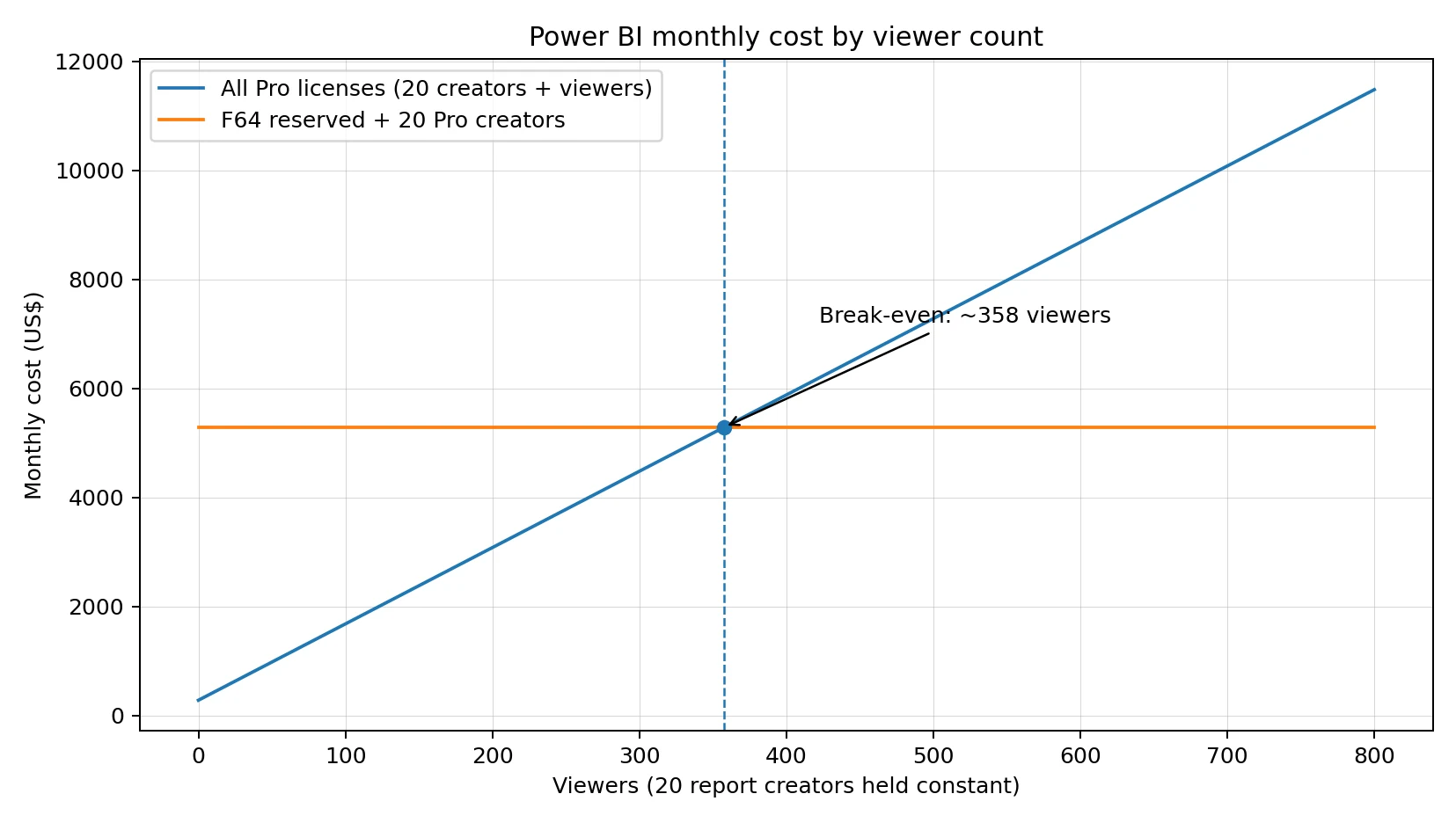
The calculation holds the creator count constant in both options, so creator license costs cancel out. It also assumes that each viewer qualifies for Free access on F64 capacity and that the Pro list price is $14 per month. With the stated F64 reservation, $5,002.67 divided by $14 gives 357.33, so the reserved-capacity option reaches break-even at 358 viewers. Always-on pay-as-you-go F64 costs $8,409.60 per month and reaches break-even at 601 viewers.
Example: 20 Report Creators and 500 Viewers
Both scenarios use US dollars and the same stated F64 reservation rate. Option A assigns Pro to all 520 people and does not buy Fabric capacity. Option B reserves F64 for one year, assigns Pro to the 20 creators and lets 500 eligible viewers access the reports with Free licenses.
The reserved F64 option costs $1,997.33 less per month under these assumptions. With always-on pay-as-you-go F64, the monthly total rises to $8,689.60, which is $1,409.60 above Option A. The 20 creators cost $280 in either scenario, so the comparison changes with the cost of serving viewers.
Does More Than 500 Users Always Make Fabric Cheaper?
The 358-viewer threshold applies only to the stated unit price, reservation term and monthly hours. Azure rates vary by region and agreement, while larger models or more concurrent activity can require additional capacity. A larger F128 reservation would cost about $10,005.33 per month under the same pricing assumptions and reach break-even at roughly 715 viewers.
Break-even chart: monthly cost by viewer count
How Much Does Power BI Embedded Cost?
Power BI Embedded uses Azure A-SKU capacity billed for each active hour. In the Central US illustration, A1 costs $1.0081 per hour and A4 costs $8.0565. Monthly totals depend on operating hours.
Power BI Embedded A-SKU Pricing
Azure charges A-SKUs for their active hours, and pausing a capacity stops its compute charges. Embedded content does not load while the capacity is paused. An A4 running for about 260 hours costs an estimated $2,094.69, compared with $5,881.25 for a 730-hour month.
Do External Customers Need Power BI Licenses?
Power BI Embedded supports two licensing patterns. With app owns data, the application authenticates to Power BI. External customers do not need individual Power BI licenses when the deployment meets Microsoft's requirements. The organization still needs Pro or PPU licenses for people who publish the content, and it pays for the capacity that serves the application.
With user owns data, people sign in with their own organizational identities and need the license required by the workspace and capacity. A-SKU capacity does not remove the per-user requirement for this model. F64 or larger capacity can allow eligible Free users to consume content in the Power BI service. Microsoft's embedded analytics capacity guidance distinguishes the two scenarios.
Power BI Embedded vs. Fabric Capacity: Which Costs Less?
A reserved F64 in US East costs $5,002.67 a month, while an A4 in Central US costs $5,881.25 running continuously. Both sit at the same size tier, but the F-SKU also carries Fabric workloads and Copilot access that A-SKUs lack. The two figures come from different US regions, so a purchase decision needs both quoted in the same region. An A4 paused outside weekday hours drops to about $2,094.69, which undercuts the reservation but gives up the Fabric extras.
A customer-facing SaaS application may need capacity around the clock because customers use it across time zones. An internal reporting team may run most reports during business hours and pause eligible capacity outside that period. For app-owns-data deployments, customer count does not create individual Power BI license charges, although higher concurrency can require a larger node.
How Much Does Power BI Cost for Different Team Sizes?
The table below prices Pro at $14 per user per month with an annual commitment. Each additional Pro seat adds $168 to the annual license bill. PPU seats cost $24 per user per month at the displayed US list price.
Calculated at $14 per user per month, with an annual commitment, in US dollars.
Small Teams With 5–25 Users
A 12-person finance team that shares reports through a standard workspace needs 12 Pro licenses, costing $168 per month or $2,016 per year. A Free user cannot open shared content in a standard Pro workspace. At 25 Pro users, the annual license bill reaches $4,200; eligible E5 users may already have Pro through their subscription.
Medium-Sized Teams With Different License Needs
A 50-person team might include eight people who need PPU features and 42 standard Pro users. The mixed license model costs $780 per month, compared with $700 for an all-Pro team. Pro users cannot read content in a PPU workspace unless they also hold PPU licenses.
A mixed team can keep standard reports in a Pro workspace and reserve PPU workspaces for PPU users. The standard workspace retains Pro limits, including the 1 GB model ceiling and eight scheduled refreshes per day. A PPU workspace requires PPU access for its readers.
Large Organizations With Hundreds of Viewers
In a 1,000-person organization, the split between creators and viewers affects the result more than headcount alone. The following comparison holds F64 reservation cost at $5,002.67 per month and gives every creator a Pro license. Free viewer access assumes the reports and underlying semantic models meet Microsoft's F64 capacity requirements.
The capacity option saves more when the organization has many viewers and fewer creators. When most employees publish content, Pro license costs account for a larger share of the total and reduce the savings from F64. The comparison treats F64 as fixed capacity and does not estimate workload headroom or report response times.
What Does Power BI Cost When Sharing Reports Externally?
External Power BI sharing can use guest access or embedded delivery. Guest access follows workspace and user licensing rules, while customer-facing app-owns-data embedding uses capacity pricing.
Sharing Power BI Reports With External Guest Users
Microsoft Entra B2B guests need a qualifying license to access shared Power BI content. The host organization can assign Pro or PPU to the guest. It can also accept the guest's existing Pro or PPU license in supported cloud arrangements, or place content on qualifying Premium capacity. A guest's existing license cannot be carried across different Azure clouds; the provider tenant must assign a license in that case.
The person inviting a guest needs Pro or PPU, and the tenant administrator must allow external sharing. Ten guest users assigned Pro licenses add $140 per month at the US list price. Free guest access is available only when the workspace and content meet the applicable Premium capacity rules.
Delivering Reports to Customers Without Individual Power BI Licenses
The app-owns-data pattern lets a business embed reports in its own application without assigning each customer a Power BI license. The business pays for the A-SKU or eligible Fabric capacity and keeps Pro or PPU licenses for the people who publish content. Capacity requirements depend on report activity and concurrent use rather than customer count alone.
Is Power BI Included in Microsoft 365 or Office 365?
Power BI Pro is included in Microsoft 365 E5 and Office 365 E5. Most other Microsoft 365 subscriptions do not include a separate Pro license. Users who share content in standard workspaces need a paid Power BI license. The included E5 license provides Pro capabilities but does not include Fabric capacity or PPU-only features.
An organization with E5 subscriptions can review assigned licenses before purchasing additional Pro seats. Forty duplicate Pro subscriptions would cost $560 per month, or $6,720 per year, at the displayed US list price. E5 users with an assigned Pro entitlement do not need another Pro seat to publish to Fabric capacity.
Eligible E5 users can add PPU for the listed $14 per user per month. Standalone Pro subscribers can also buy the add-on, although the combined price should be compared with a standalone PPU subscription. Copilot requires an eligible paid capacity, not an E5 license or PPU alone.
How Can Businesses Reduce Power BI Costs?
License costs rise when users hold features they do not need. Capacity costs rise when organizations choose a SKU without checking usage patterns. Refresh activity also consumes capacity resources, so schedules should reflect actual data and reporting needs.
Flexera's 2026 State of the Cloud Report found that respondents estimated 29% of IaaS and PaaS spending was wasted. The figure describes cloud infrastructure and platform spending broadly, not Power BI specifically. It provides wider context for checking consumption before changing a Fabric or Embedded capacity.
Which Power BI Pricing Plan Should You Choose?
Plan choice follows the job the organization needs to do, and the cheapest license rarely covers all of it. The table pairs eight common situations with a starting option. Viewer counts, model sizes and region then decide the final purchase, as the earlier sections show.
Gartner’s 2026 Magic Quadrant for Analytics and Business Intelligence Platforms, published June 29, 2026, describes a market moving toward agentic AI, governed semantics and AI-augmented decision support. Its abstract says vendors differ in how well they deliver secure self-service and interoperable analytics.
The abstract discusses platforms rather than license tiers, so it supports only a narrow point: a $14 price per seat says nothing about governance, security or cross-tool analytics needs. Those requirements show up in budgets as capacity, storage and governance work that per-seat prices leave out.
Final Words
Power BI costs depend on who creates reports, who views them and where the content runs. Pro and PPU charge by user, while Fabric and Embedded charge for capacity under different billing models. A cost comparison is useful only when it includes the required licenses, workload and expected operating hours.
Frequently Asked Questions About Power BI Cost
Power BI Free costs $0, Pro costs $14 per user per month and Premium Per User costs $24, with yearly payment. Fabric and Embedded prices depend on capacity, region and running hours; the F2 reservation example in this article is about $156.33 per month.
Power BI Desktop and a Free account cost nothing for personal report creation and use. Sharing in standard workspaces requires Pro or PPU, while eligible viewers can use Free licenses on F64 or larger capacity.
Power BI Pro costs $168 per user per year at $14 per month on an annual term. A 50-person team pays $8,400 a year.
Premium Per User costs $24 against $14 for Pro, raises the model limit from 1 GB to 100 GB and the refresh limit from 8 to 48 a day. It also adds XMLA read/write access, and readers of PPU workspace content normally need PPU licenses themselves.
In a standard workspace, yes: viewers need Pro or PPU. On F64 or larger capacity, viewers can read on free licenses, while creators still need Pro.
F2 is the smallest paid capacity, at $0.36 an hour on US East pay-as-you-go, or about $262.80 for a 730-hour month. A one-year reservation brings it to about $156.33 a month, and F2 meets the minimum capacity requirement for Copilot in Power BI.
An A1 node costs $1.0081 an hour in Central US, or about $735.91 for a 730-hour month, and an A4 costs $8.0565 an hour, or about $5,881.25. Pausing capacity outside working hours cuts those figures, with an A1 on 260 weekday hours costing about $262.11.
References
- Microsoft. Power BI Pricing. powerbi.microsoft.com
- Microsoft. Microsoft Fabric Pricing. azure.microsoft.com
- Microsoft. Power BI Embedded Pricing. azure.microsoft.com
- Microsoft Learn. Fabric Licensing Overview. learn.microsoft.com
- Microsoft Learn. Power BI Premium Per User. learn.microsoft.com
- Microsoft Learn. Embedded Analytics Capacity and SKUs. learn.microsoft.com
- Microsoft Learn. Microsoft 365 E5 License Includes. microsoft.com
- Microsoft Learn. Power BI Premium P SKU Retirement. learn.microsoft.com
- BARC. The BI & Analytics Survey 26 (24th Edition). barc.com
- Flexera. 2026 State of the Cloud Report (15th Annual). flexera.com
- Gartner. Magic Quadrant for Analytics and Business Intelligence Platforms. gartner.com
Try Reporting Hub free for 30 days
Deploy to your own Azure environment with the self-serve guided installer and be live in minutes - BI Genius Starter included on every plan.